

Picture this: you walk in Monday morning, and the server is down, the files are gone, or a ransom note is sitting on your screen. Would you be able to recover from this?
For a small business, lost data means lost revenue, stalled work, and customers wondering why nobody’s picking up. The good news is there’s a simple, well-tested way to stay ahead of it: the 3-2-1 backup rule, popularized by photographer Peter Krogh, back when “the cloud” still just meant weather.
One way to strengthen your business’s data protection strategy is by following the 3-2-1 backup rule. This simple approach helps businesses maintain multiple copies of important data so they have a better chance of recovering when something goes wrong.
What Is the 3-2-1 Backup Rule?
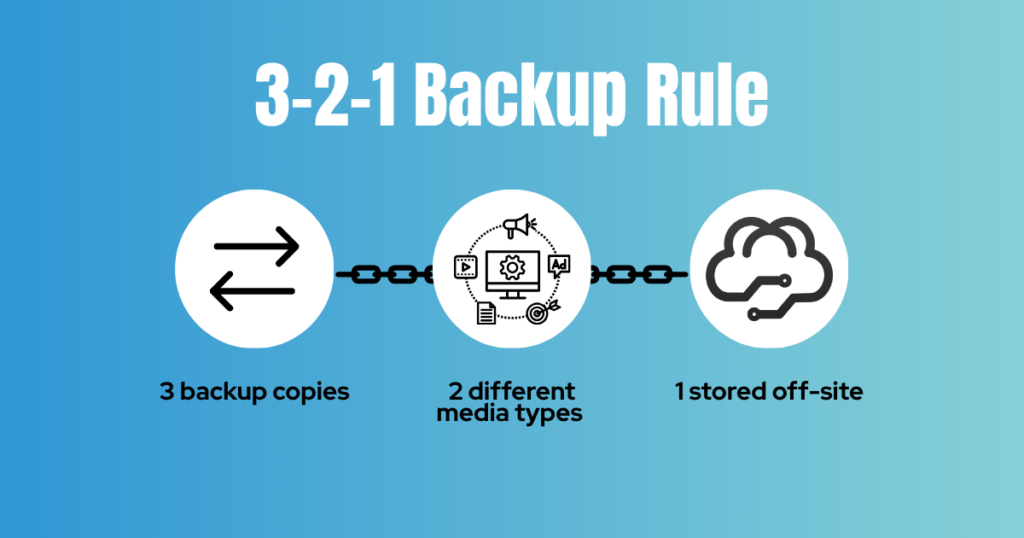
The 3-2-1 backup rule is a data protection strategy that recommends keeping three copies of your data, storing those copies on two different types of storage media, and keeping at least one copy off-site. Here’s how it works:
3 Copies of Your Data
Keep three copies of your important business data: the original and at least two backups. Your original data might live on your business computer, server, or network. The additional copies give you alternatives if the original becomes unavailable, corrupted, or compromised.
For example, if an employee accidentally deletes an important customer file, you may be able to restore it from a backup rather than recreate it from scratch.
2 Different Types of Storage
Store your data across two different storage devices or media types.
These might include an on-site server, an external hard drive, a network-attached storage (NAS) device, or cloud storage. Using different storage types can help reduce the risk of a single device failure affecting every copy.
However, simply having multiple copies isn’t enough. If all your backups are connected to the same network and a cyberattack compromises that network, those backups could be at risk, too.
1 Off-Site Copy
Keep at least one backup in a separate physical location from your primary business data. Cloud backups are one common way to accomplish this, while a secure backup stored at another physical location may also work.
An off-site copy can help protect your business if a local event, such as a fire, flood, theft, or other disaster, damages your equipment and on-site backups at the same time. The goal is that if one copy of your data is lost, you have other copies available to help you recover.
Why Does the 3-2-1 Backup Rule Matter for Small Businesses?
Small businesses run on the same technology for everything: customer records, financials, scheduling, inventory, and email. When that data disappears, it’s not just an IT problem. Employees can’t work, customers wait, and recovery eats time you don’t have.
The 3-2-1 rule protects you from the usual suspects: accidental deletion, hardware failure, ransomware, and local disasters. But backups are only one piece of your cybersecurity strategy. Access controls, monitoring, employee training, and a tested recovery plan all matter too.
Three Things to Consider Beyond the 3-2-1 Rule
The 3-2-1 backup rule provides a solid starting point, but a complete backup strategy involves more than making copies of your data.
1. Encrypt Your Backups
Backups contain the same sensitive information as your original files, which means they need protection, too.
Encryption helps make backed-up data unreadable to unauthorized parties without the appropriate decryption key. This is especially important when backups contain customer information, employee records, financial data, or other confidential business information.
Ask your IT provider how your backups are encrypted, how encryption keys are protected, and who can access or restore the data.
2. Establish Appropriate Data Retention Policies
How long should your business keep its backups? The answer depends on your operational needs, industry requirements, and applicable laws or regulations.
Some businesses may need to retain certain records for several years. For example, businesses subject to HIPAA requirements must follow applicable rules for protecting electronic protected health information and maintaining required documentation. Specific retention periods depend on the type of record and the applicable requirement; HIPAA does not establish a single universal backup retention period for all businesses.
Your business should establish a retention policy that defines how long different types of data are kept, when older backups expire, and how data is securely disposed of when it is no longer needed.
A managed backup solution may offer configurable retention periods to help businesses align their backup practices with their needs and requirements. Be sure to confirm that your specific solution and policies meet any applicable compliance obligations.
3.Test Your Backups and Recovery Process
A successful backup is only useful if you can restore the data when you need it.
Regularly test your backups to confirm that files can be recovered and that your recovery process works as expected. Consider how long it would take to restore critical systems and how much recent data your business could afford to lose.
Two useful concepts to discuss with your IT provider are:
- Recovery time objective (RTO): How quickly your business needs systems and data restored after an interruption.
- Recovery point objective (RPO): How much recent data your business can afford to lose, measured in time.
Testing helps uncover problems before an actual emergency, when the stakes are much higher.
Where Managed Backup Comes In
Knowing the 3-2-1 rule is the easy part. Running it is the work: scheduling backups, keeping copies isolated from the rest of your network, encrypting everything, testing restores, and catching the job that quietly failed at 2 a.m.
That’s where managed backup from ALLO Business comes in. Our team handles the setup, monitoring, and recovery testing, so your 3-2-1 plan is happening instead of sitting on a to-do list. And because we’re a local provider, you get a local team you can actually call.
Is Your Business Backup Strategy Ready for the Unexpected?
A backup plan shouldn’t be something you think about only after data goes missing. Encrypt your backups, set a retention policy, and test your recovery process, and you’ll know where you stand before you need it.
Not sure your backups would hold up on your worst day? Let’s find out before you have to. Talk to ALLO Business about managed backup, and we’ll look at what you have today, point out the gaps, and map out a plan that fits.
Frequently Asked Questions About the 3-2-1 Backup Rule
What is the 3-2-1 backup rule?
The 3-2-1 backup rule recommends keeping three copies of your data, storing them across two different types of storage media, and keeping at least one copy off-site. This approach helps reduce the risk of losing all your data in a single incident.
Is cloud storage enough to follow the 3-2-1 backup rule?
Cloud storage can help satisfy the off-site backup requirement, but simply storing files in the cloud does not automatically create a complete backup strategy. Businesses should consider independent backup copies, access controls, encryption, retention policies, and recovery testing.
How often should a small business back up its data?
The ideal frequency depends on how often your data changes and how much information your business can afford to lose. Businesses that update important records throughout the day may need more frequent backups than those with less frequent changes. Your backup schedule should align with your recovery point objective.
How long should a business keep its backups?
There is no single retention period that works for every business. The right timeframe depends on business needs, available storage, recovery requirements, and applicable legal or regulatory obligations. Businesses should document their retention policies and review them regularly.
Can backups protect my business from ransomware?
Backups can help your business recover from ransomware, but only if usable copies remain available and haven’t been compromised or encrypted by the attack. Restricted access, isolated or immutable backups, encryption, and regular recovery testing can help strengthen your defenses.
What’s the difference between data backup and disaster recovery?
Data backup involves creating copies of information, so it can be restored if lost or damaged. Disaster recovery is the broader process of restoring systems, applications, and business operations after a major disruption. Backups are an important part of a disaster recovery plan, but they are not the entire plan.